TLS/SSL Certificates. Why/What/How?

WHY?
Let’s begin with acronyms-
TLS — Transport Layer Security
SSL — Secure Socket Layer
When sending and receiving traffic through Internet (which basically is group of computers connected together) , any computer on the path could read what you are sending to the destination or receiving from it.
So, security experts developed an encryption protocol to send and receive sensitive data on the internet. That how SSL is born. It was developed at Netscape in 1990's.
Later on, SSL 3.1 version was later developed into TLS(Transport Layer Security) 1.0 with the name changed to indicate that it no longer associated to netscape. Because of this SSL and TLS terms are interchangeably used.
WHAT?
Q. What is a TLS certificate?
A TLS certificate is certificate is issued by the Certificate Authority(CA) to the person or business who owns a domain.
Q. What is a Certificate Authority?
Certificate Authority is a trusted entity responsible for issuing digital Certificates. Digital Certificates are used to verify the identity of individuals, servers, and other entities on internet.
There are several CAs like DigiCert, Lets Encrypt, GoDaddy, Amazon Trust Services, GlobalSign.
Q. How can anyone create a Certificate Authority?
The approval process to become a Certificate Authority involves various steps and entities, and depends on the industry and the CA itself. The general view is that it need to comply with guidelines of :
Browser and Operating System Vendors
Certification Authorities/Browser Forum (CA/B Forum)
WebTrust Audits
Cross-Signing by Existing CAs
Compliance with Industry Standards
To view a SSL certificate for a domain , Simply type the domain in the chrome browser, and click on the tune icon (replaces the lock icon) in the address bar.
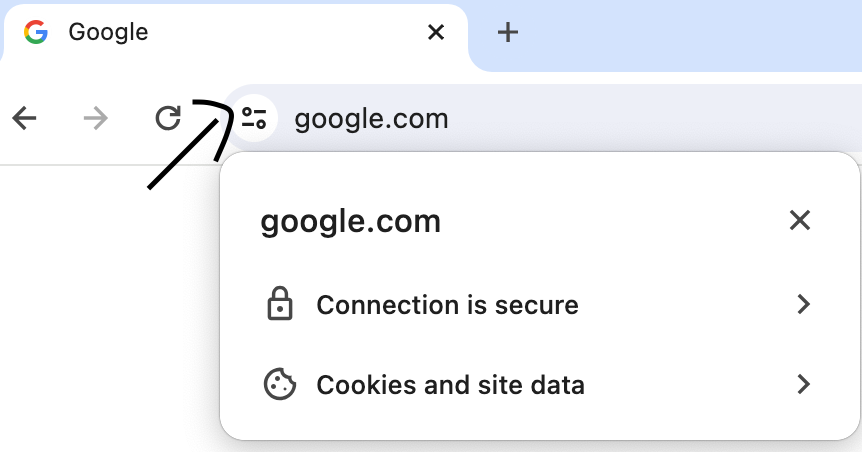
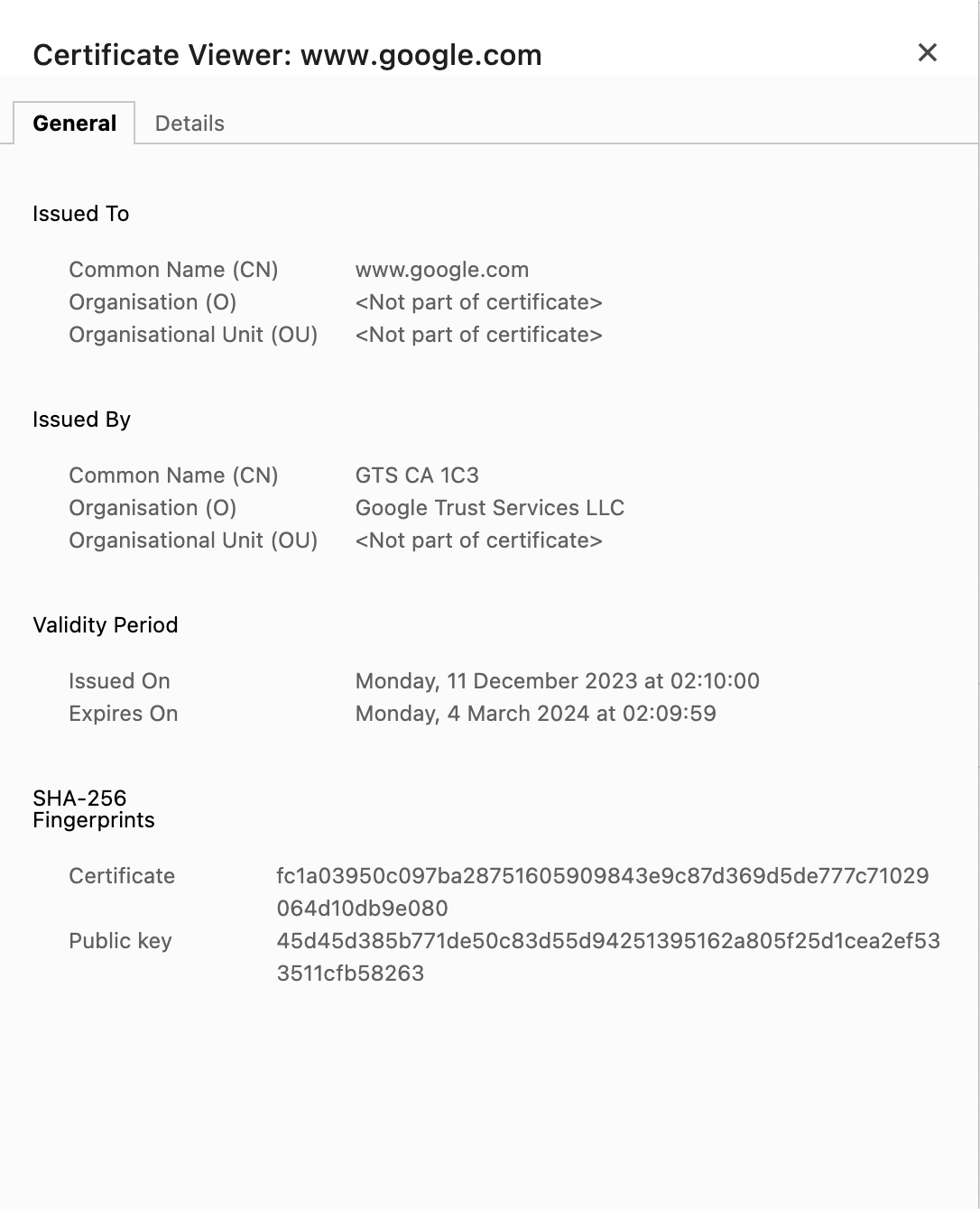
You can see all the certificate details by the following these steps:
Connection is secure → Certificate is Valid.
The Certificate usually contains the following Sections:
Q. What are types of SSL certificates and how are they classified?
There are two types:
1. Self-Signed Certificates
2. Trusted CA signed certificates
and are in turn classified based on the validation performed by CA while issuing certificate and the number of domains they secure.
Certificate based on validation level:
| Certificate Type | Level of Validation | Verification Process | Example of Use |
| Domain Validated (DV) | Lowest | - Verification of control over the domain either through email confirmation or DNS record placement. | Personal blogs, small websites, internal systems |
| Organization Validated (OV) | Moderate | - Domain ownership verification. | |
| - Checks on the organization’s legal existence and operational status. - Verification of organization’s name, address, and phone number. | E-commerce websites, corporate websites | ||
| Extended Validated (EV) | Highest | - Thorough checks on domain ownership. - Organization identity and legal existence verification. - Standardized verification process, including legal documents and direct communication. | Financial institutions, major e-commerce platforms |
Certificates based on number of domains they secure:
| Certificate Type | Description | Example Usage |
| Single Domain | Issued for a single, specific domain. | www.example.com |
| Wild Card | Issued for a domain and all its subdomains, denoted by an asterisk (*) as the leftmost label | .example.com, .app.example.com |
| Multi-Domain (SAN/UCC) | Includes multiple domains in a single certificate, also known as Subject Alternative Name. | www.example.com, mail.example.net, secure.example.org |
- To learn more: type-of-ssl
HOW?
Q. How to generate a Self Signed TLS/SSL Certificate?
Below are the steps required to create self signed certificate
Private Key Generation
Certificate Signing Request Generation
Self Signed Certificate Generation
Certificate Verfification
For this purpose, we use an OpenSSL an open source tool tool for TLS/SSL protocols. If you don't have OpenSSL in your system, install using your system package manager.
# To  check if pre installed
openssl -v
# To install on mac
brew install openssl
# To install on Debian/Ubuntu
sudo apt-get update
sudo apt-get install openssl
- Once you have OpenSSL installed, create a private key using the following command
openssl genpkey -algorithm RSA -out my_private_key.pem
# genpkey -> generate private key
# -algorithm -> algorithm to use for key generation. you can use stronger algorithms like Elliptic Curve Cryptography or others
# -out -> specifies the output file
- Use the following command to generate a Certificate Signing Request(CSR)
openssl req -new -key my_private_key.pem -out my_new_csr.pem
# req -> specifies operation is related certificate requests(CSR)
# new -> indicates new csr being created
# key -> specifies your private key
# out -> specifies ouput file that contains the CSR
Once you run the command, you will be asked to fill the some details. I am attaching a sample screen shot of the values i entered when i ran the above command

- Use the following command to generate Self Signed Certificate
openssl x509 -req -in my_new_csr.pem -signkey my_private_key.pem -out my_cert.pem

# x509 -> specifies that you are working with X.509 certificates, which are the standard format for public key certificates.
# -req -> indicates that you are working with a certificate signing request (CSR). The CSR is a request sent to a Certificate Authority (CA) to obtain a digital certificate.
# -in -> specifies input file for the command, which is your CSR containing all the entity values
# -signkey -> specifies the private key to sign the certificate
# -out -> specifies the output file which contains the certificate
- Use the following command to verify the certificate
openssl x509 -text -noout -in my_cert.pem
# -text -> outputs the certificate in human readable format
# -noout -> tells openssl not to output encoded data
# -in -> input file for open ssl
Q. How to generate trusted CA signed certificates?
There are several sites that provide SSL Certificates such as DigiCert, GoDaddy, Sectigo, SSL.com. I am going to use Lets Encrypt which provides free SSL certificates. The steps are:
Ensure You Have a Domain:
- You need a registered domain for which you want to obtain an SSL certificate. Ensure that your domain is correctly configured and pointing to the server where your website is hosted.
Access Your Server:
- You need SSH access to your server. Log in using your preferred SSH client.
Install Certbot:
Certbot is the recommended client for obtaining Let's Encrypt certificates.
For Ubuntu/Debian:
  sudo apt-get update
  sudo apt-get install certbot
Obtain a Wildcard Certificate:
To obtain a wildcard certificate, you'll need to use the DNS-01 challenge method, which involves proving that you control the DNS records for your domain. Here is an example command:
sudo certbot certonly --manual --preferred-challenges=dns -d *.yourdomain.comReplace
yourdomain.comwith your actual domain.Certbot will provide instructions on how to create a DNS TXT record for your domain. Follow these instructions carefully. You will need to add the TXT record to your DNS configuration.
Verify DNS Configuration:
- After adding the TXT record, wait for DNS propagation, and then press Enter to allow Certbot to verify the DNS configuration. Certbot will check if the TXT record is present before issuing the wildcard certificate.
Certificates and Key Locations:
- Once the verification is successful, Certbot will generate the wildcard certificate and private key. The certificate files will be located in a directory like
/etc/letsencrypt/live/yourdomain.com/. Note the paths to thecert.pem,privkey.pem, andfullchain.pemfiles.
- Once the verification is successful, Certbot will generate the wildcard certificate and private key. The certificate files will be located in a directory like
Configure Your Web Server:
- Update your web server configuration to use the newly obtained wildcard certificate. You may need to adjust the SSL configuration in your server settings.
Automate Renewal (Optional but Recommended):
- Similar to a regular certificate, it's essential to set up automatic renewal for your wildcard certificate. Certbot typically configures this during installation, but you can verify it with the
sudo certbot renew --dry-runcommand.
- Similar to a regular certificate, it's essential to set up automatic renewal for your wildcard certificate. Certbot typically configures this during installation, but you can verify it with the
Credits: I am grateful for the knowledge gained from both aboutssl.org and ChatGPT. This blog is a testament to the collaborative learning environment fostered by these resources.
About the author
Computers Exposed - Delving Into the Whys, Whats, and Hows of the Digital Frontier!🚀💡
